Understanding Kubernetes Architecture: A Deep Dive into Container Orchestration

Super Admin
Author
Introduction
After spending years managing Kubernetes clusters in production, I've realized that understanding its architecture isn't just academic—it's essential for debugging issues at 3 AM, optimizing resource usage, and making intelligent infrastructure decisions. Let me walk you through how Kubernetes actually works under the hood.
The Control Plane (Kubernetes Master)
The control plane is the brain of your cluster. It makes global decisions about the cluster and detects and responds to cluster events. Let's break down each component:
API Server: The Single Source of Truth
The API Server is the front door to Kubernetes. Every component, including kubectl, the web UI, and internal controllers, communicates exclusively through the API Server. It's the only component that directly talks to etcd.
When you run
kubectl apply -f deployment.yamlKey responsibilities:
- Authentication and authorization (RBAC)
- Admission control (validation, mutation, policy enforcement)
- RESTful API endpoint for all cluster operations
- The only component that reads/writes to etcd
Scheduler: The Resource Matchmaker
The Scheduler watches the API Server for newly created pods that have no assigned node. Its job is simple in concept but complex in execution: find the best node for each pod.
The scheduling process happens in two phases:
- Filtering: Which nodes CAN run this pod? (Checks resource requirements, node selectors, taints/tolerations, affinity rules)
- Scoring: Which node SHOULD run this pod? (Ranks viable nodes based on resource balance, data locality, spreading)
In production clusters with hundreds of nodes and thousands of pods, scheduler performance becomes critical. I've seen poorly configured affinity rules bring schedulers to their knees.
Controller Manager: The Reconciliation Engine
The Controller Manager is actually a collection of controllers, each responsible for a specific resource type:
- ReplicaSet Controller: Ensures the desired number of pod replicas are running
- Deployment Controller: Manages ReplicaSets for rolling updates
- Node Controller: Monitors node health and evicts pods from failed nodes
- Service Controller: Provisions load balancers in cloud environments
- Endpoint Controller: Populates endpoint objects (links Services and Pods)
Each controller runs a continuous reconciliation loop: "What's the desired state? What's the actual state? Make them match." This is the heart of Kubernetes' declarative model.
etcd: The Cluster Database
etcd is a distributed key-value store that holds the entire cluster state. If etcd is corrupted or lost, your cluster is effectively dead—even if all your pods are running happily.
Critical facts about etcd:
- Uses the Raft consensus algorithm for distributed consistency
- Requires an odd number of nodes (3, 5, or 7) for quorum
- Should be backed up religiously (I've seen companies lose entire clusters)
- Performance matters—slow etcd means slow API Server means slow everything
- In production, run etcd on dedicated nodes with SSD storage
Worker Nodes: Where Applications Actually Run
Worker nodes are the workhorses that run your containerized applications. Each node runs several components:
kubelet: The Node Agent
The kubelet is the primary node agent. It registers the node with the API Server, watches for pods assigned to its node, and ensures those containers are running and healthy.
What kubelet does:
- Pulls container images
- Starts and stops containers via the container runtime (containerd)
- Mounts volumes
- Reports pod and node status back to the API Server
- Performs liveness and readiness probes
- Collects resource metrics
Important: kubelet only manages containers created by Kubernetes. If you manually start a Docker container, kubelet ignores it.
Container Runtime: The Execution Layer
The container runtime (typically containerd now, since Docker was deprecated as a runtime) is what actually runs your containers. The kubelet talks to it through the Container Runtime Interface (CRI).
kube-proxy: The Network Rules Manager
Despite its name, kube-proxy doesn't actually proxy traffic anymore—at least not in most configurations. It manages network rules on the node (using iptables or IPVS) to implement Kubernetes Services.
When you create a Service, kube-proxy ensures that traffic sent to the Service's ClusterIP gets distributed to the correct pod endpoints. It's the plumbing that makes service discovery work.
Pods: The Smallest Deployable Unit
Pods are the atomic unit in Kubernetes. A pod can contain one or more containers that share:
- Network namespace (same IP address, can communicate via localhost)
- Storage volumes
- Lifecycle
Most pods run a single container, but sidecar patterns (like service meshes) use multiple containers per pod.
How It All Works Together: A Request Flow
Let's trace what happens when you run
kubectl create deployment nginx --image=nginx --replicas=3- kubectl constructs an HTTP POST request and sends it to the API Server
- API Server authenticates you, checks if you have permission (RBAC), runs admission controllers, and stores the Deployment object in etcd
- Deployment Controller (watching the API Server) sees the new Deployment and creates a ReplicaSet
- ReplicaSet Controller sees the new ReplicaSet and creates 3 Pod objects
- Scheduler sees 3 unscheduled Pods, evaluates all nodes, and assigns each Pod to a suitable node (updates the Pod spec in etcd via API Server)
- kubelet on each selected node sees Pods assigned to it, pulls the nginx image, and starts the containers
- kube-proxy on all nodes watches for new Pods and updates iptables rules if a Service exists
- Controllers continuously watch and reconcile—if a Pod dies, the ReplicaSet Controller creates a new one
Everything is asynchronous. Everything is declarative. Everything flows through the API Server.
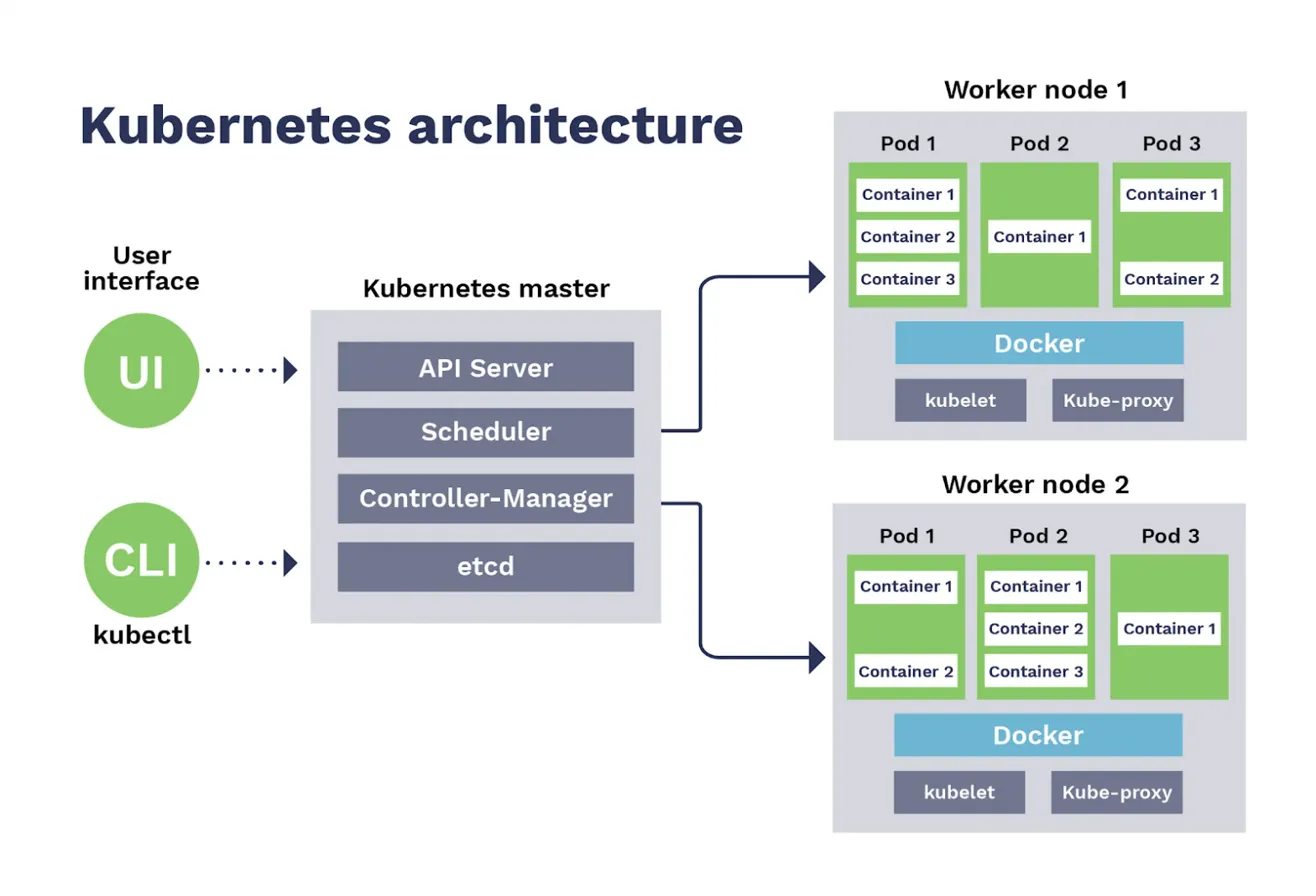
Understanding the Image Architecture
Looking at the diagram, notice:
Left Side - User Interaction:
- UI and CLI (kubectl) both talk exclusively to the API Server
- No direct access to other control plane components
- No direct access to worker nodes
Middle - Control Plane:
- All components are stacked, showing they typically run on dedicated master nodes
- In production, you'd have 3-5 replicas of these running across multiple nodes for HA
- etcd at the bottom emphasizes it's the foundation—everything else is stateless
Right Side - Worker Nodes:
- Multiple worker nodes running identical components (kubelet, kube-proxy)
- Docker layer represents the container runtime
- Pods containing containers are the actual workload
- Each pod can have multiple containers (sidecar pattern)
The Arrows:
- Control plane components communicate with worker nodes exclusively through the API Server
- Scheduler assigns pods to nodes
- Controller Manager creates and manages pod lifecycles
- kubelet on each node pulls from the control plane and executes
Production Considerations
After running Kubernetes in production, here's what matters:
High Availability:
- Run 3+ API Server instances behind a load balancer
- Run 3-5 etcd nodes (always odd numbers for quorum)
- Multiple Controller Managers and Schedulers (only one active due to leader election)
- Spread control plane across availability zones
Security:
- Enable RBAC and principle of least privilege
- Use Network Policies to isolate workloads
- Keep secrets encrypted at rest in etcd
- Regularly rotate certificates and credentials
- Use Pod Security Standards (PSS) to enforce security policies
Observability:
- Monitor etcd health and latency religiously
- Track API Server request rates and latencies
- Watch scheduler queue depths
- Monitor node resource usage
- Set up alerts for pod restarts and failures
Resource Management:
- Set resource requests and limits on all pods
- Use node pools for different workload types
- Implement pod disruption budgets for high availability
- Configure horizontal pod autoscaling (HPA) for dynamic workloads
Common Misconceptions
"Kubernetes restarts pods" - Wrong. Kubernetes replaces failed pods with new ones. The pod gets a new IP, new volumes (unless persistent), new everything.
"Services load balance traffic" - Services are just an abstraction. kube-proxy/iptables or your CNI plugin does the actual load balancing.
"Namespaces provide security isolation" - Namespaces are organizational. For real isolation, you need Network Policies, RBAC, and Pod Security Standards.
"The master node runs my applications" - By default, the control plane nodes have a taint that prevents regular workloads from being scheduled there. Your apps run on worker nodes.
Conclusion
Kubernetes architecture is elegant in its simplicity: a declarative API, a persistent data store, and a bunch of controllers continuously reconciling desired state with actual state. Understanding this architecture isn't just about passing certifications—it's about being able to troubleshoot production issues, optimize performance, and make intelligent design decisions.