Docker for Beginners: Your Gateway to Modern Application Development

Rohan Shrestha
Author
Docker for Beginners: Your Gateway to Modern Application Development
If you've been exploring the world of software development, you've probably heard the term "Docker" thrown around quite a bit. Maybe you've wondered what all the fuss is about, or why developers seem so excited about it. Well, you're in the right place! Let me break down Docker in a way that actually makes sense.
What is Docker, Really?
Imagine you've built a beautiful sandcastle at the beach. Now imagine you could pick up that entire sandcastle, preserve it exactly as it is, and place it on any other beach in the world where it would work perfectly. That's essentially what Docker does for software applications.
Docker is a platform that packages your application and everything it needs to run (code, libraries, dependencies, settings) into a single container. This container can then run consistently on any machine that has Docker installed, whether it's your laptop, a colleague's computer, or a massive server in the cloud.
Why Should You Care About Docker?
Let's talk about a problem every developer has faced: "But it works on my machine!" Sound familiar? You write code that runs perfectly on your computer, but when your teammate tries to run it, everything breaks. Different operating systems, different versions of libraries, different configurations – it's a nightmare.
Docker solves this by creating isolated environments called containers. Think of containers as lightweight, portable boxes that contain everything your application needs. When you share a Docker container, you're sharing the exact environment your app runs in, eliminating those frustrating compatibility issues.
Key Concepts You Need to Know
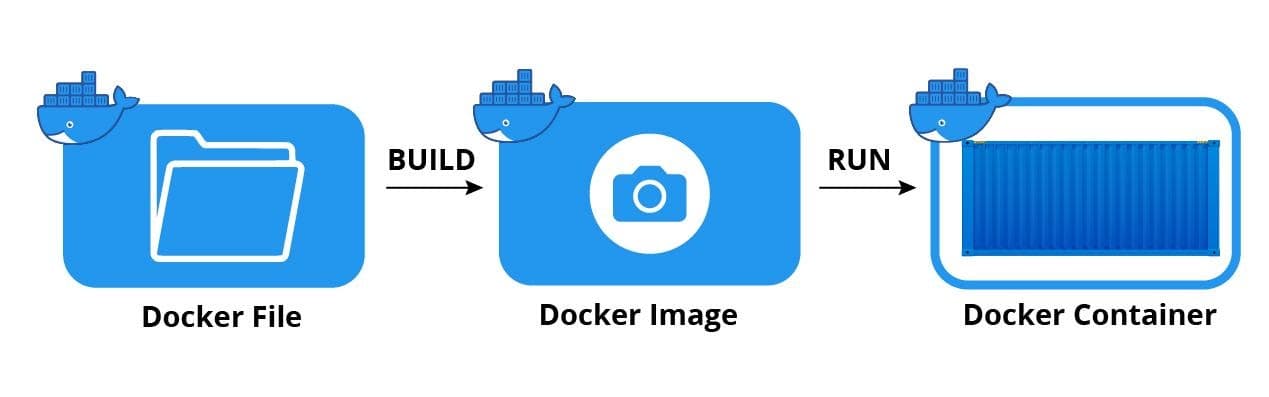
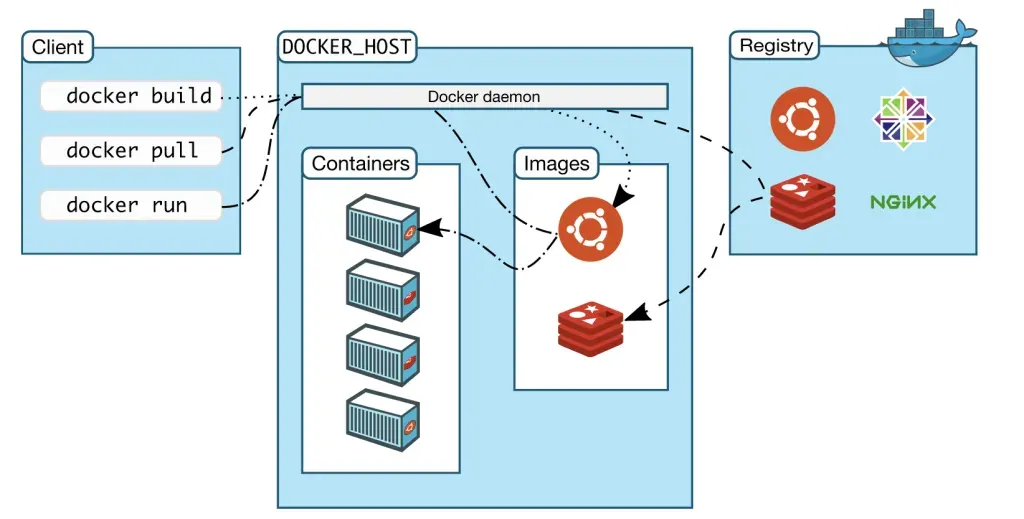
Images: Think of a Docker image as a blueprint or recipe. It contains instructions for creating a container, including the application code, runtime environment, libraries, and dependencies. Images are read-only templates.
Containers: A container is a running instance of an image. If the image is the recipe, the container is the actual meal you've cooked. You can create multiple containers from a single image.
Dockerfile: This is a text file containing commands that Docker uses to build an image. It's like writing down your recipe step by step.
Docker Hub: This is like GitHub, but for Docker images. It's a registry where you can find and share pre-built images. Need a Node.js environment? There's an image for that. Need PostgreSQL? There's an image for that too.
Getting Started: Your First Docker Container
Let's keep this practical. Here's how you can run your first container in just a few steps.
First, install Docker Desktop from the official Docker website. It's available for Windows, Mac, and Linux. Once installed, open your terminal and type this simple command:
bashdocker run hello-world
Congratulations! You just ran your first Docker container. Docker downloaded the "hello-world" image and ran it in a container, which printed a welcome message and then stopped.
Now let's try something more useful. Want to run a web server? Try this:
bashdocker run -d -p 8080:80 nginx
Open your browser and go to
localhost:8080Real-World Use Cases
Development Environments: Set up complex development environments in minutes instead of hours. Need to work on a project that requires Python 3.8, PostgreSQL, and Redis? Docker can have that ready faster than you can make coffee.
Testing: Test your application across different environments and versions without cluttering your machine. Want to test against multiple database versions? Spin up containers for each version.
Microservices: Docker is perfect for microservices architecture, where applications are broken into smaller, independent services. Each service runs in its own container.
Collaboration: Share your exact development environment with teammates, ensuring everyone works with identical setups. No more "works on my machine" excuses.
Common Beginner Mistakes to Avoid
Don't confuse Docker with virtual machines. While they seem similar, containers share the host system's kernel and are much lighter and faster than VMs. A VM might take gigabytes of space and minutes to start, while a container takes megabytes and starts in seconds.
Don't store important data inside containers without using volumes. Containers are meant to be temporary. If you delete a container, any data inside it is gone. Use Docker volumes to persist data.
Don't run everything as root inside containers. Follow security best practices from the start. Create specific users for your applications.
Your Next Steps
Start simple. Don't try to containerize your entire application stack on day one. Begin by running existing images from Docker Hub. Experiment with official images like nginx, postgres, or node. Get comfortable with basic commands like
docker psdocker imagesdocker stopThen, create your first Dockerfile for a simple application. Maybe a basic Node.js or Python app. Learn how to build images and run containers from them. Once you're comfortable, explore Docker Compose for managing multi-container applications.
The Docker documentation is excellent, and the community is incredibly helpful. Don't hesitate to ask questions on forums like Stack Overflow or the Docker Community Forums.
Final Thoughts
Docker isn't just a trendy tool – it's become a fundamental part of modern software development. It solves real problems and makes developers' lives significantly easier. The learning curve might seem steep at first, but start with the basics, practice regularly, and you'll soon wonder how you ever developed without it.
Remember, every expert was once a beginner. Take it one step at a time, experiment fearlessly (containers are disposable, after all!), and enjoy the journey into containerization.
Happy Dockering!
Related Articles
Docker Explained Simply: How to Package and Run Your Apps Anywhere
Learn Docker the easy way! This beginner-friendly guide breaks down how Docker works using simple cooking analogies. Discover how to package your application once and run it anywhere from your laptop to the cloud without worrying about compatibility issues.
Understanding Docker Architecture: A Simple Guide with Real-World Examples
Docker-Architecture-A-Simple-Guide-with-Real-World-Examples